

The ring-by-ring quality system

Every tunnel defect, evidenced ring by ring.

Crews log defects, injections and before-and-after photos on their phones, offline underground. You validate the evidence from the surface and hand your client a record that stands up to audit.

Start a 14-day pilot

On Sydney Metro West since July 2026: 3,158 defects on one register, across two tunnel drives.

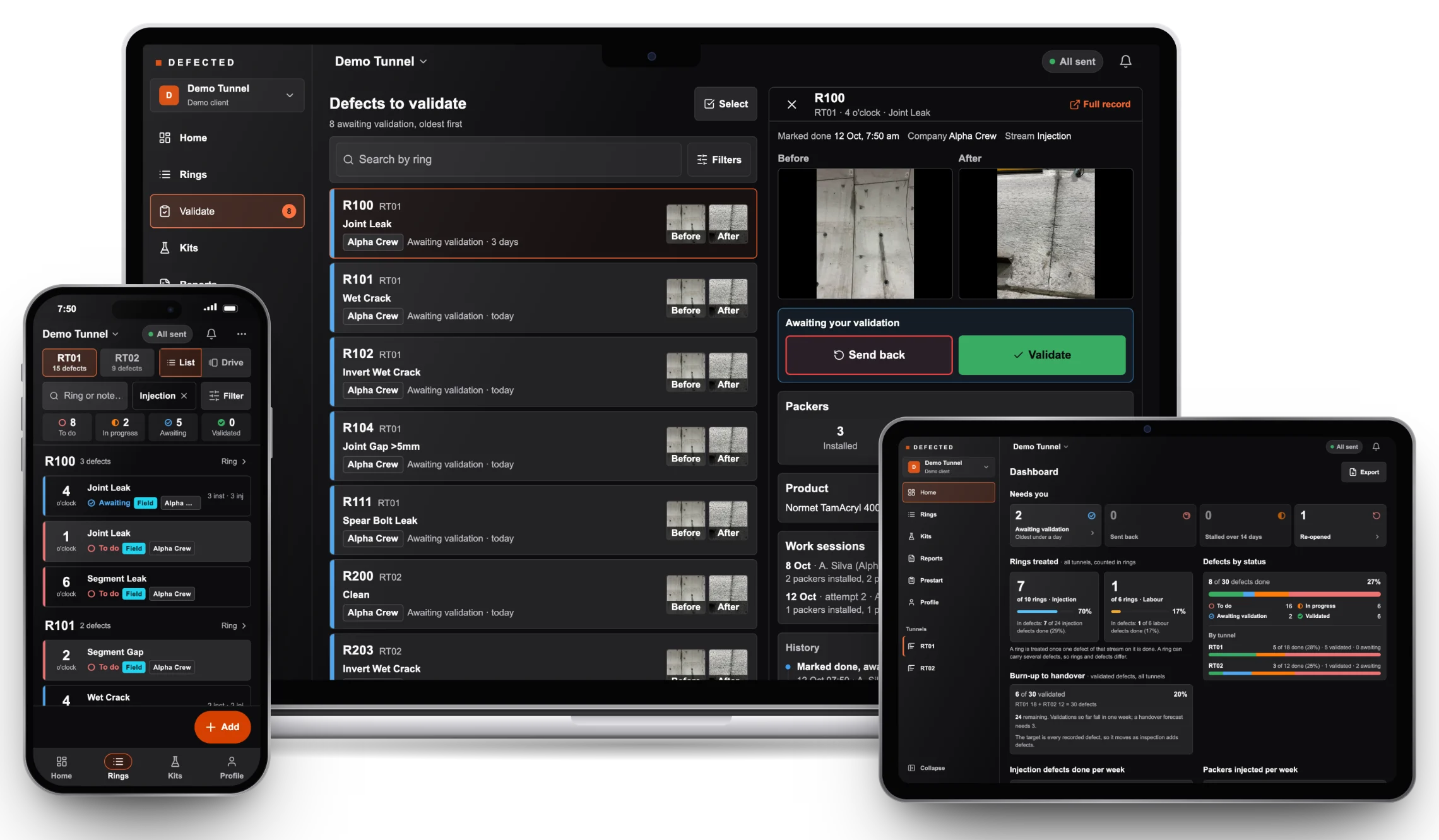
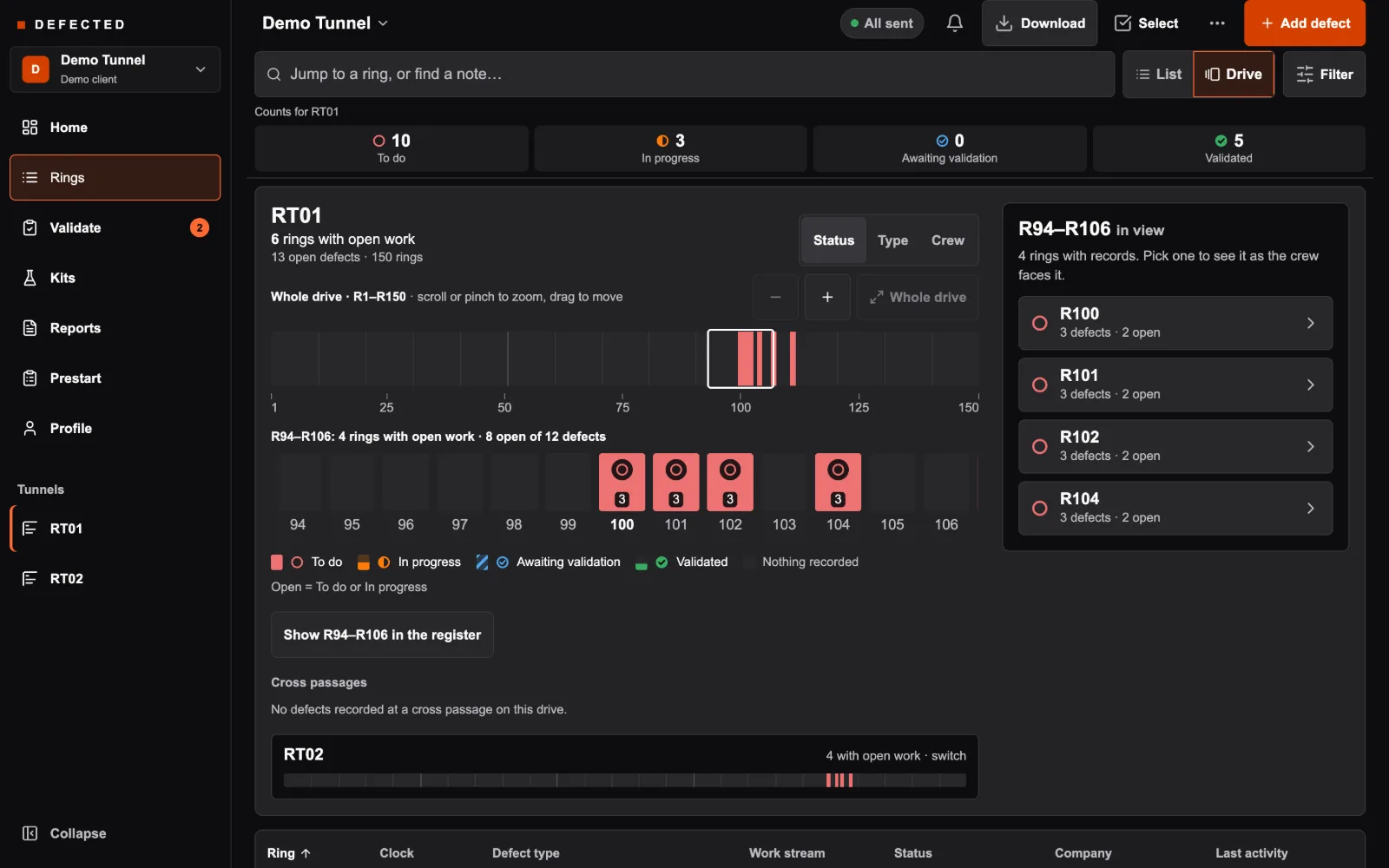
DEFECTED on a MacBook, an iPad and an iPhone: the engineer's validation queue with before and after photos, the supervisor's dashboard, and the crew's ring list
Live on
Sydney MetroGamuda Australia
The problem

Underground, paper still wins. And it's costing you.

Paper forms get lost

Every missed defect is rectification work paid for twice: once in handover, once in dispute.

Photos live in 6 phones

No before/after pairing means no evidence, and no defence when the client claims non-conformance.

Excel can't track 3,000 rings

QA managers spend days reconciling sheets. Auditors find gaps. Margin disappears in admin.

Generic tools think in floors, not rings

General-purpose platforms are built around drawings, rooms and sheets. A tunnel defect is a ring, a clock position and a packer count.

DEFECTED is built by Victor, an injector who works night shifts on Sydney Metro West Portion 1, on a crew that uses the app. About DEFECTED

How it works · Follow one defect

From the ring to your client, without a sheet of paper.

Underground: the crew. Three steps on the phone, at the defect.

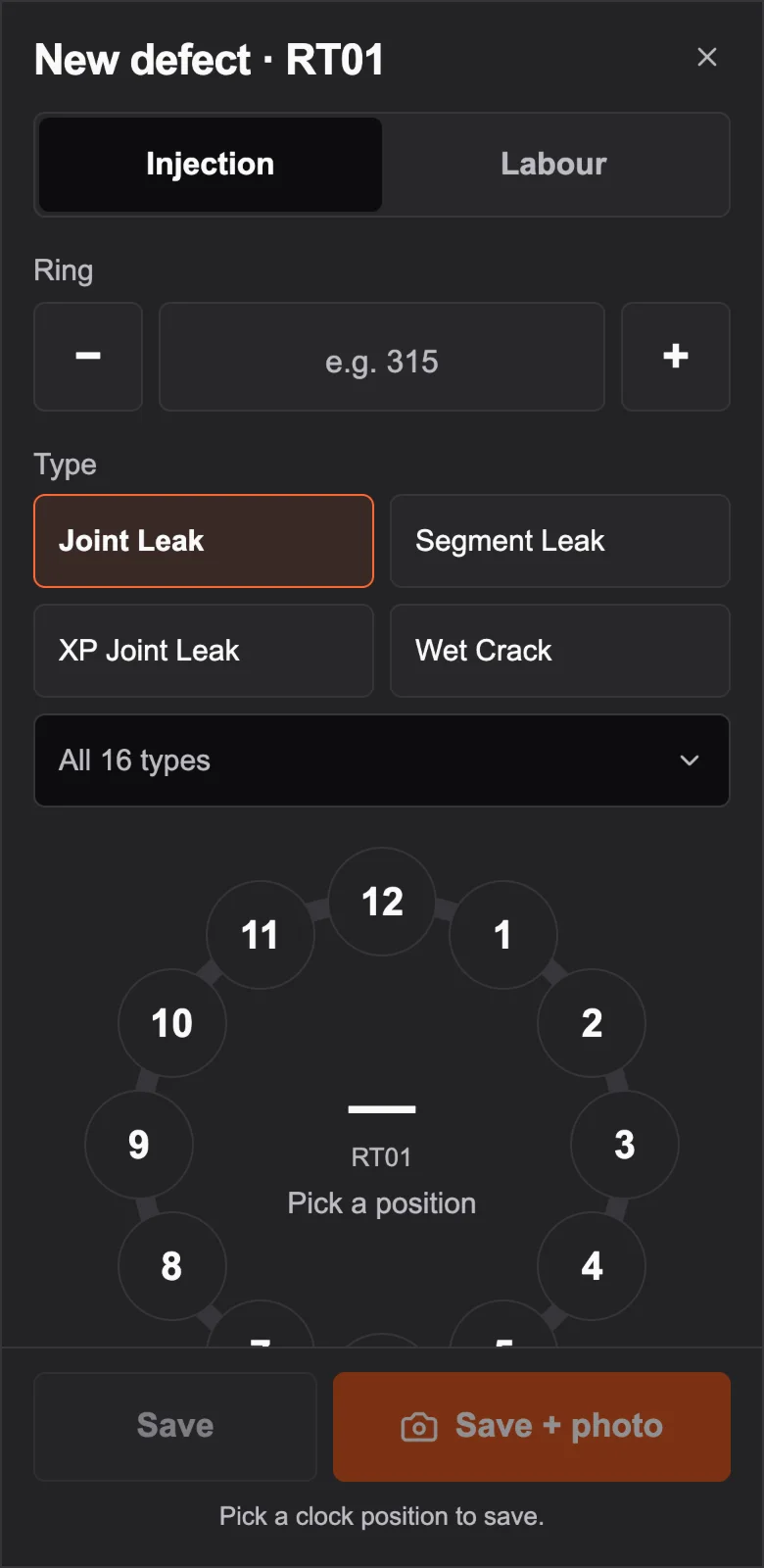
  1. Adding a defect: injection or labour, the ring number, the defect type, and a clock face for its position
    01 / 03

    Logged at the ring

    Injection or labour, the ring, the defect type, and its position tapped on a clock face. On the phone the crew already carries, with no signal needed at depth.

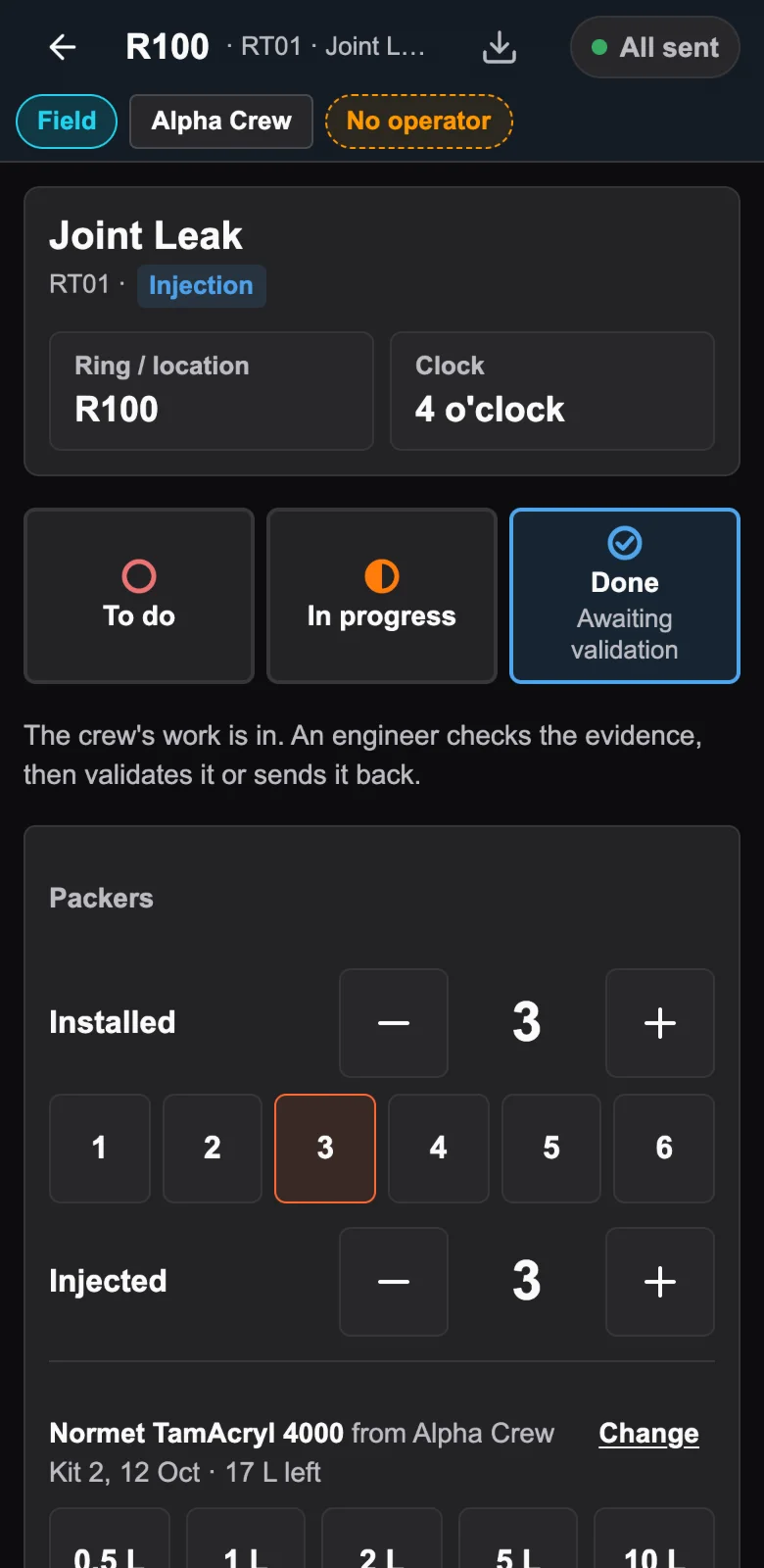
  2. Packers installed, injected and patched on the defect, and the product used: Normet TamAcryl 4000, 10.5 litres
    02 / 03

    Injection recorded as it happens

    Packers installed, injected and patched are counted on the defect. Product is drawn from a kit, so the litres go on the record with the product and its batch.

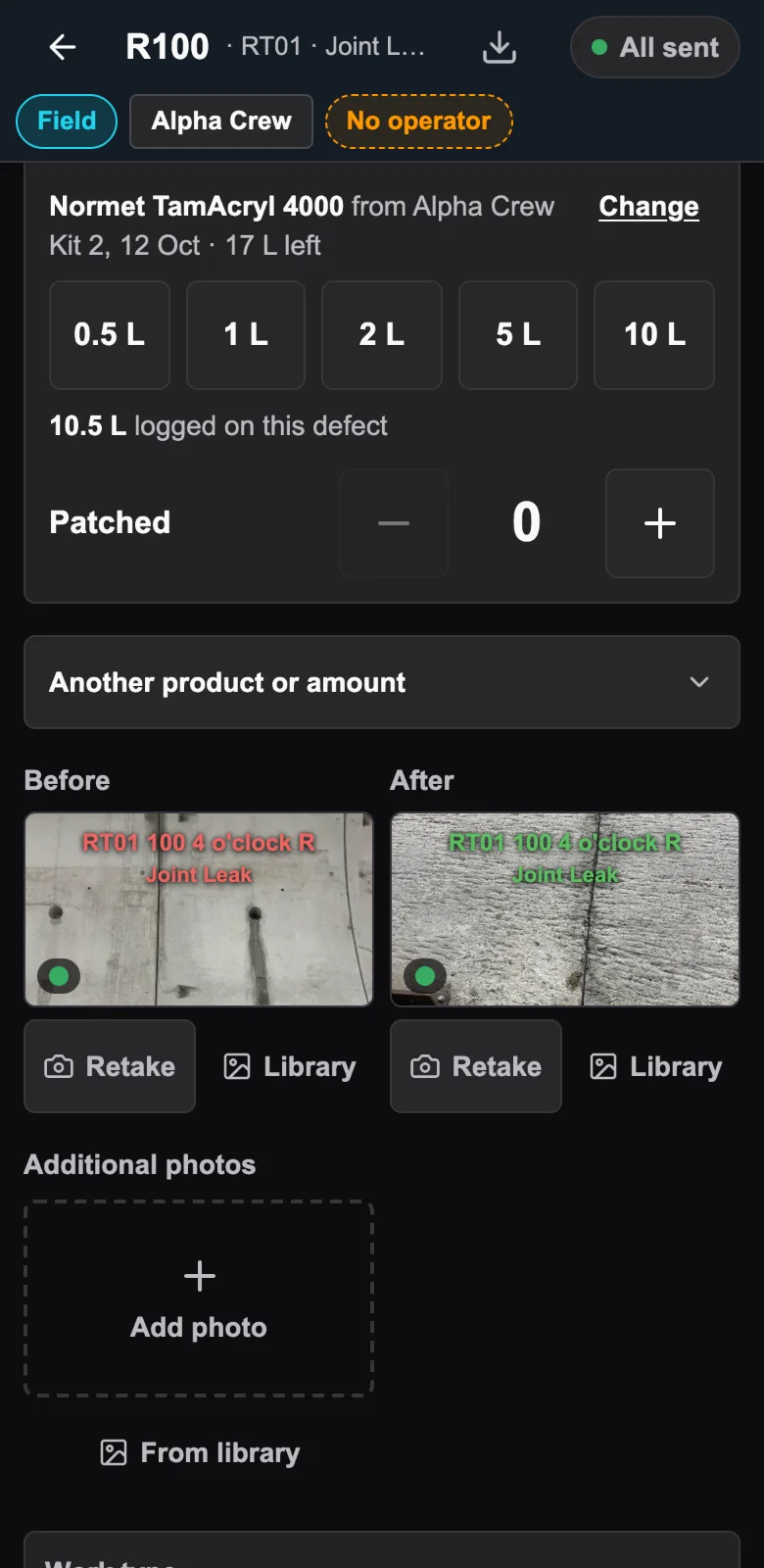
  3. The defect marked done, its before and after photos on the defect with its tunnel, ring, clock position and defect type, awaiting validation
    03 / 03

    Closed with proof

    Both photos carry the time they were taken, burned into the image, and stay on the defect with its tunnel, ring and clock position. Done only unlocks once the after photo is attached, and then it goes to the engineer.

Above ground: the engineer

Nothing is closed until an engineer says so.

You don't go down. The evidence comes up, and every close-out waits for your decision.

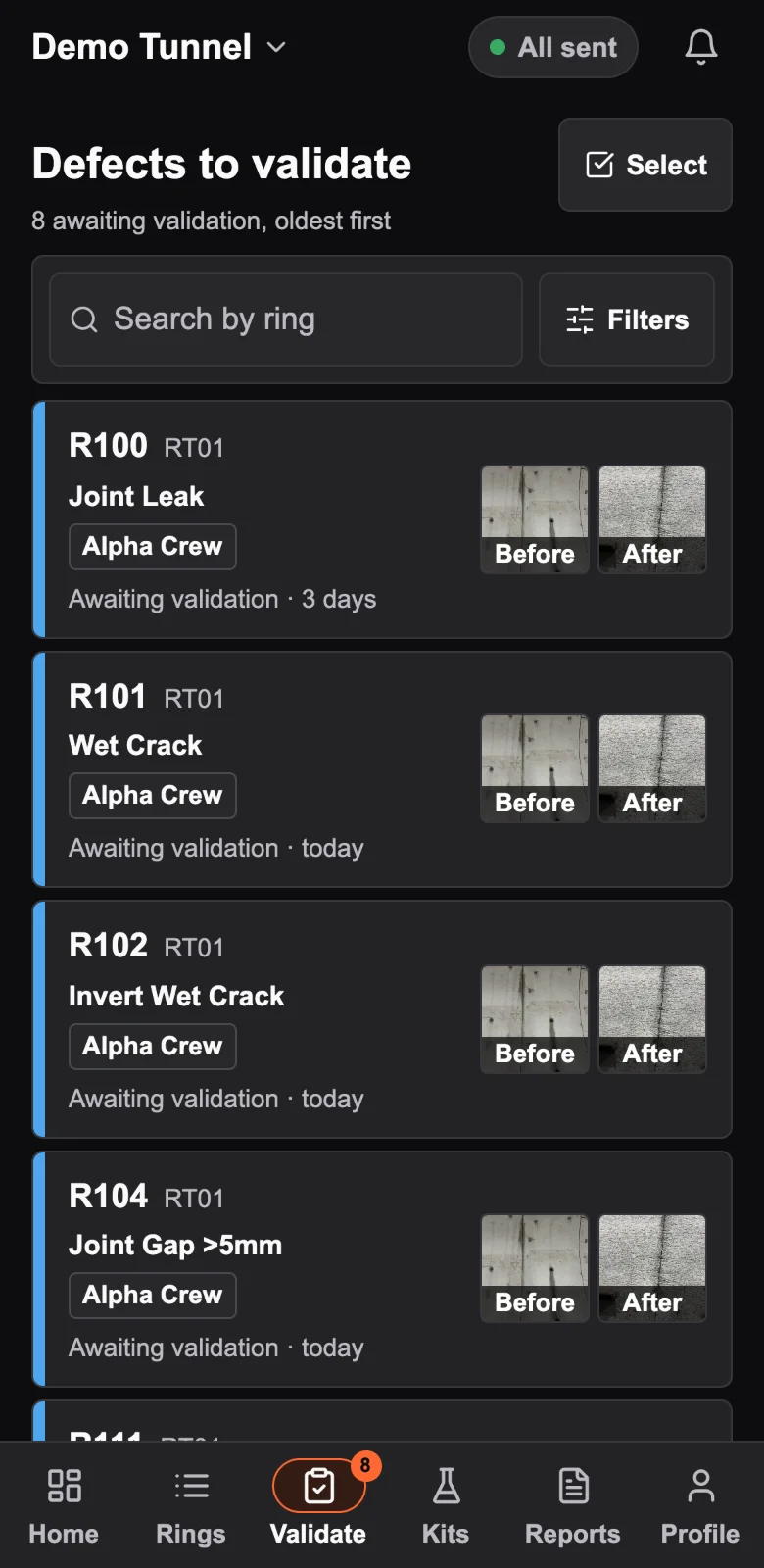
  1. Defects to validate: the queue, oldest first, with ring, defect type, company and when each was done
    04 / 08

    Every close-out lands in your queue

    Oldest first, filtered by tunnel, cross passage, company, work stream or defect type. A defect is only closed when an engineer validates it.

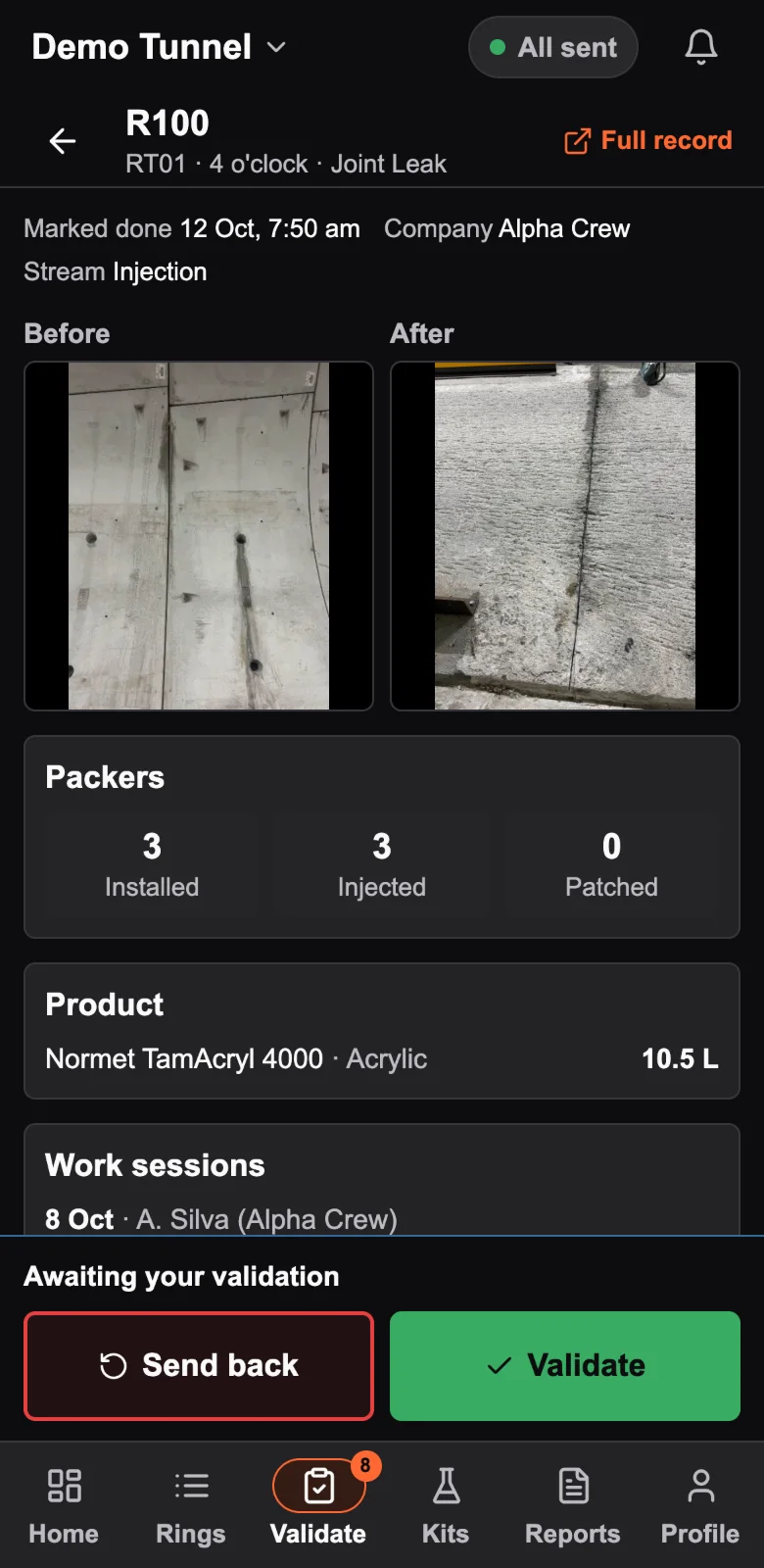
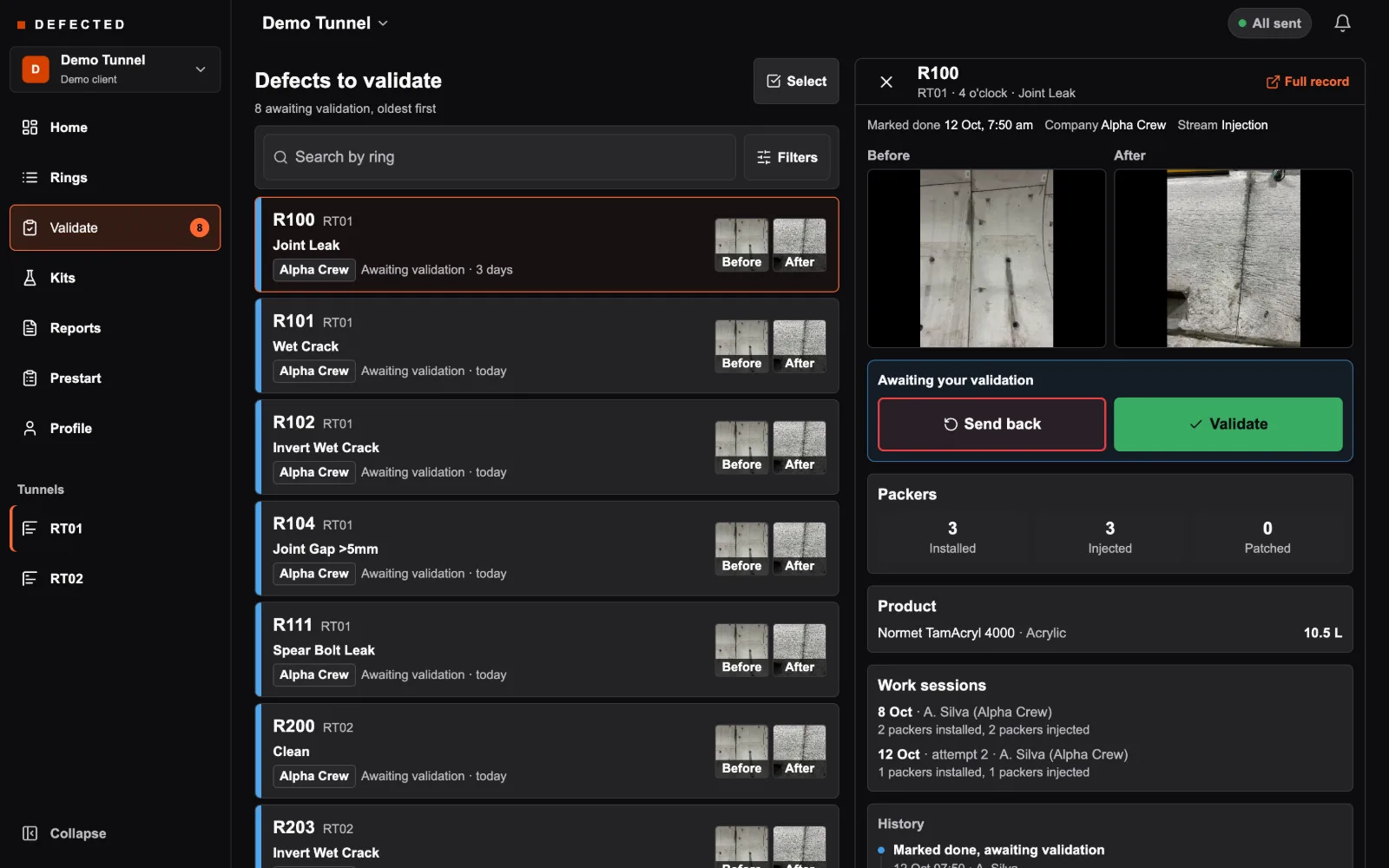
  2. A defect awaiting validation: Send back and Validate, with the before and after photos
    05 / 08

    Check the evidence, not a tick-box

    Before and after side by side, then the packers, the litres of product, every work session and the defect's history on the same screen. Validate one, or a selected batch at once.

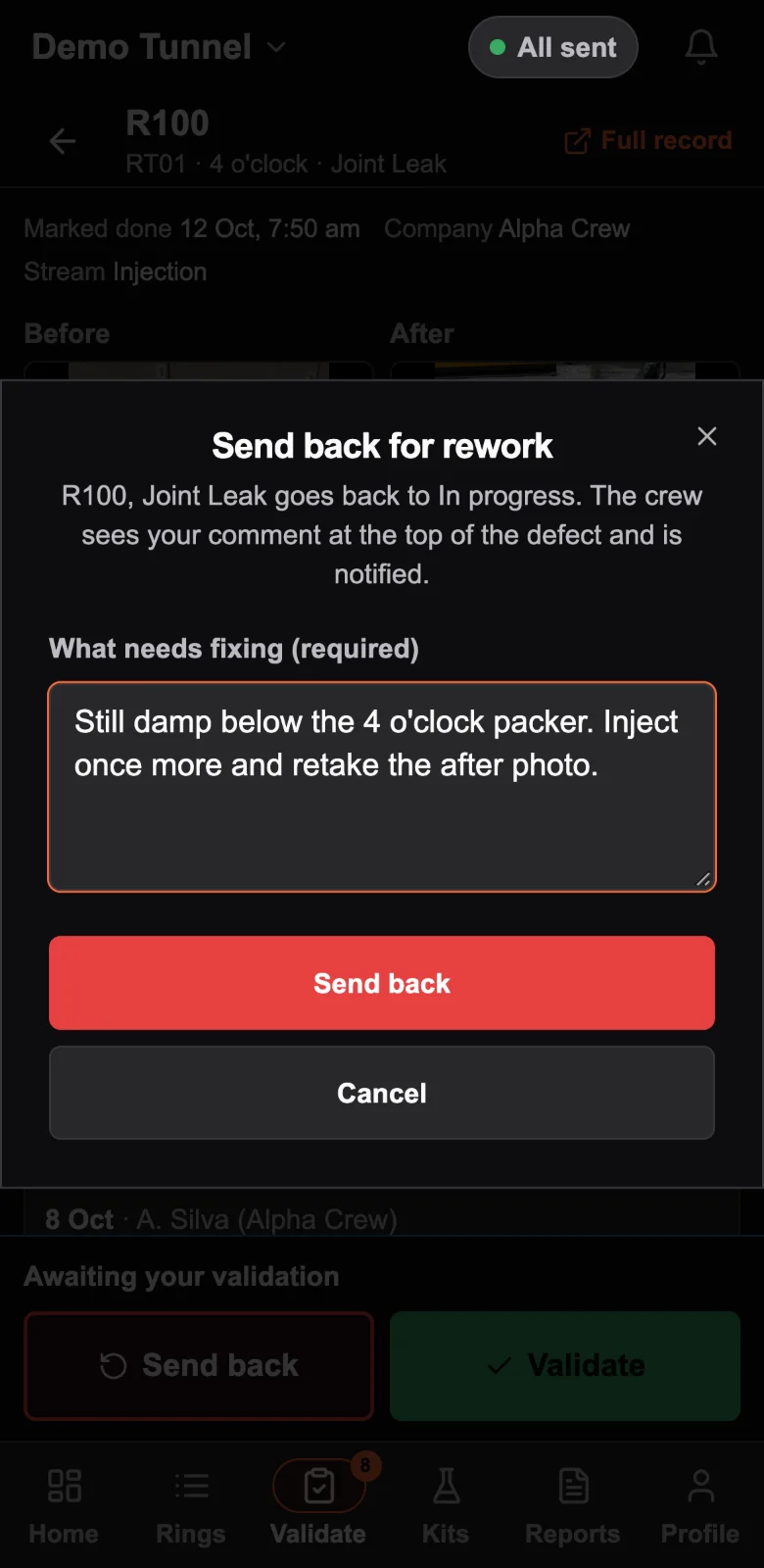
  3. Send back for rework: the defect goes back to in progress, with a required comment on what needs fixing
    06 / 08

    Not right? Send it back, with the reason

    A comment is required. The defect goes back to in progress, the crew is notified, and your words stay at the top of the defect until it is done again.

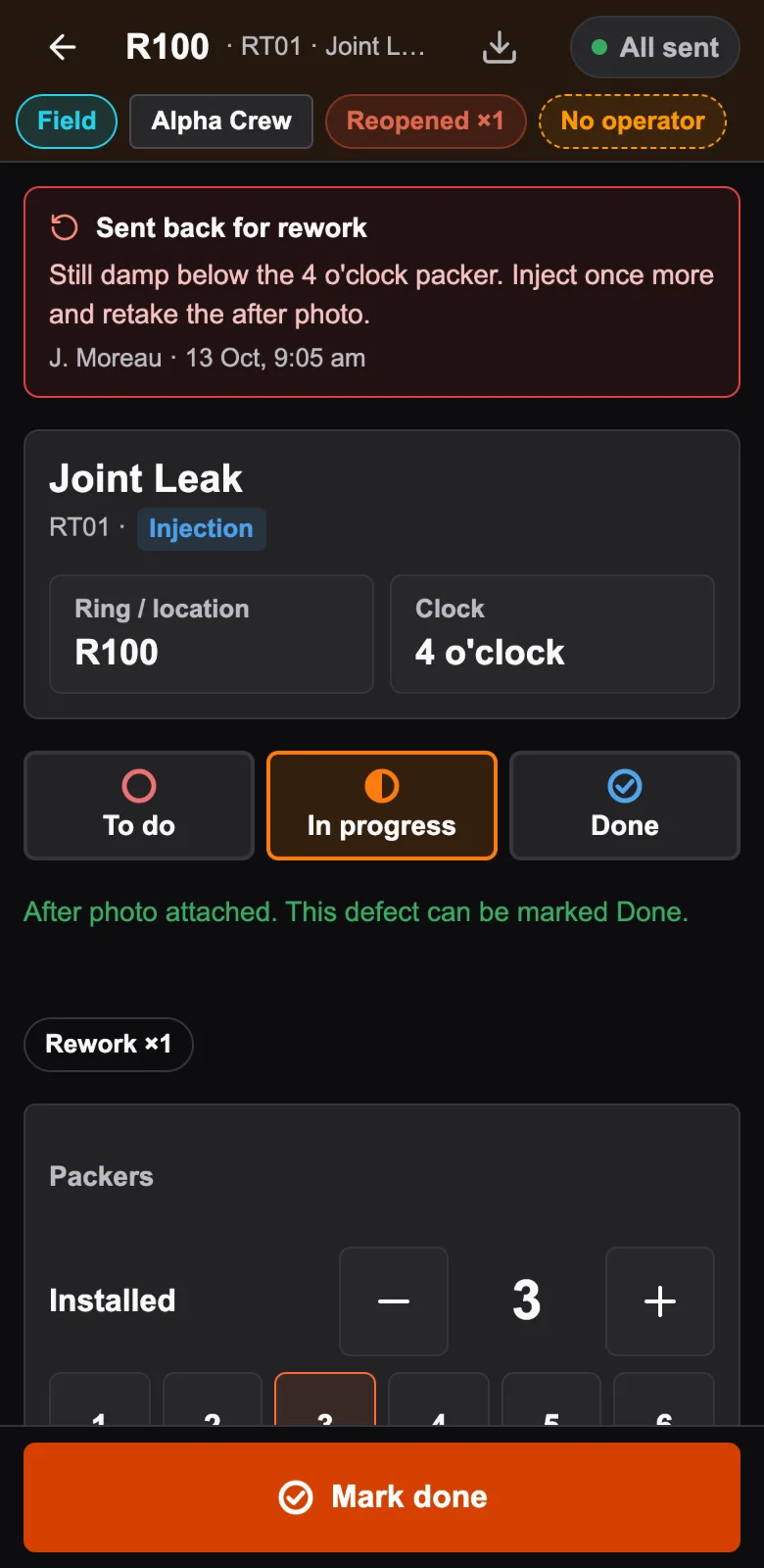
  4. The crew's view: Sent back for rework, with the engineer's comment, name and time at the top of the defect
    07 / 08

    The crew sees exactly what to fix

    Underground, the defect carries your comment, your name and the time. When it comes back done, it is back in your queue.

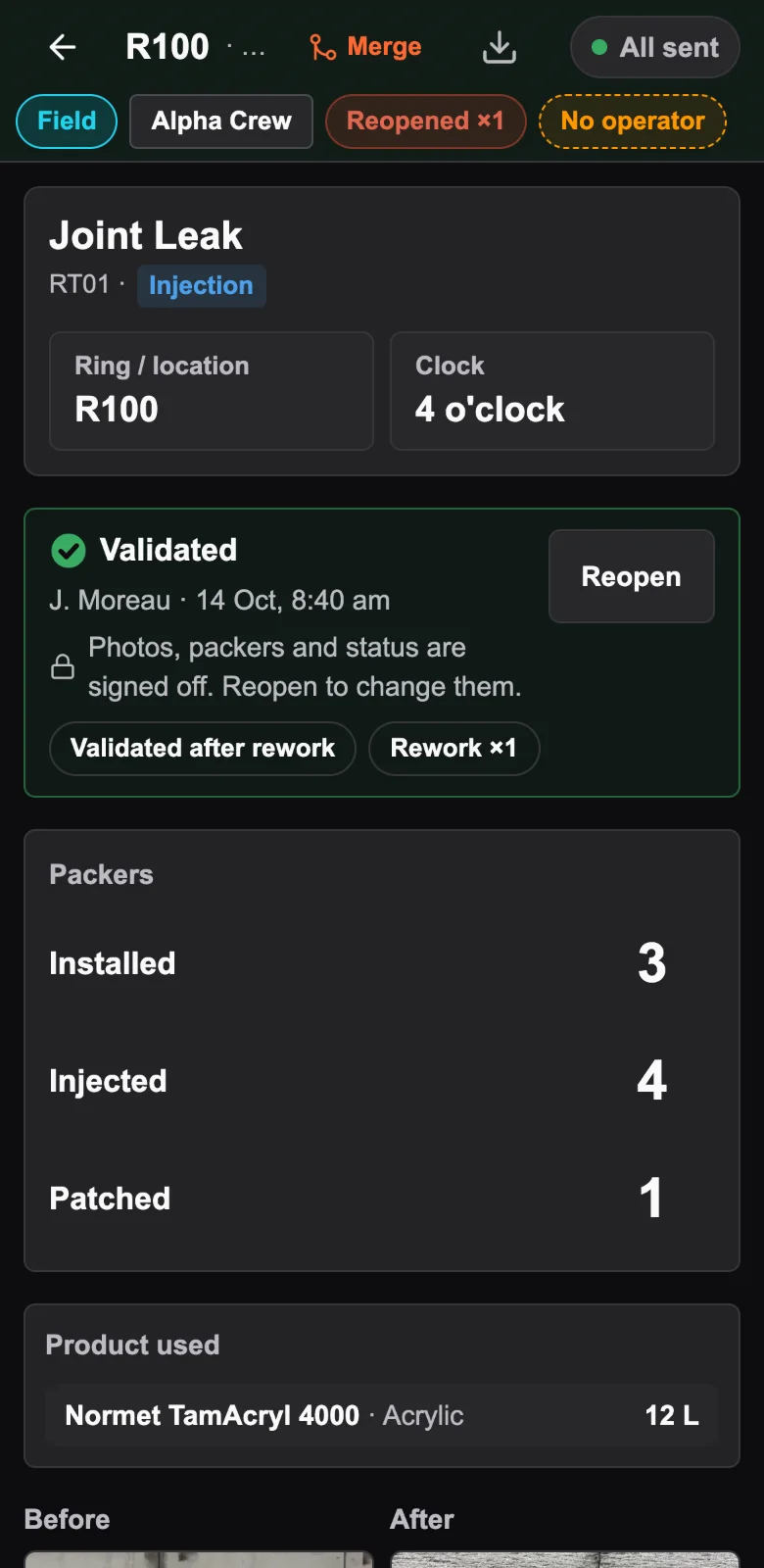
  5. The defect validated by the engineer, marked Validated after rework and Rework ×1, with its before and after photos
    08 / 08

    Validated, and it says how

    Signed off in your name, with the time. First-time validation or validated after rework, and how many times it went back: the badges stay on the defect.

At your desk

The same queue, on the screen you monitor the job from.

The validation queue on a desktop: filters for tunnel, cross passage, company, work stream, defect type and dates, the list of defects awaiting validation, and the open defect beside it with Send back, Validate, before and after photos, packers, product, work sessions and history

The queue beside the evidence. Filter, open a defect, check its photos, packers, litres, work sessions and history, then validate or send it back without leaving the list.

Open the validate view full size

The record

Every defect carries its own history.

When a client asks what happened at ring 100, the answer is on the defect: every step, who took it, when, and why.

R100 · RT01 · 4 o'clock · Joint Leak
Demo defect
Validated after reworkRework ×1Reopened ×1
History
  1. Validated
    14 Oct 08:40 · J. Moreau · engineer
  2. Marked done, awaiting validation
    13 Oct 13:45 · A. Silva
  3. After photo attached
    13 Oct 13:40 · A. Silva
  4. Updated packer counts
    13 Oct 13:31 · A. Silva
  5. Sent back for rework
    13 Oct 09:05 · J. Moreau · engineer

    "Still damp below the 4 o'clock packer. Inject once more and retake the after photo."

  6. Marked done, awaiting validation
    12 Oct 07:50 · A. Silva
  7. After photo attached
    12 Oct 07:48 · A. Silva
  8. Updated packer counts
    12 Oct 07:16 · A. Silva
  9. Reopened (in progress)
    12 Oct 06:30 · A. Silva

    "Leak returned at the same location: weeping again after the weekend's rain."

  • Who and when, every time

    Every line names the person and the minute: logged, photos, packer counts, done, sent back, reopened, validated.

  • In their own words

    An engineer's send-back and a crew's reopen reason are kept word for word, so the record says why, not just what.

  • Written by the server

    The status history is written by the database on every change, from any phone. Nobody can edit or delete it from the app.

  • Litres, and the batch they came from

    Every draw from a kit is logged with the litres, ring, clock position, time and person, against the kit's batch number.

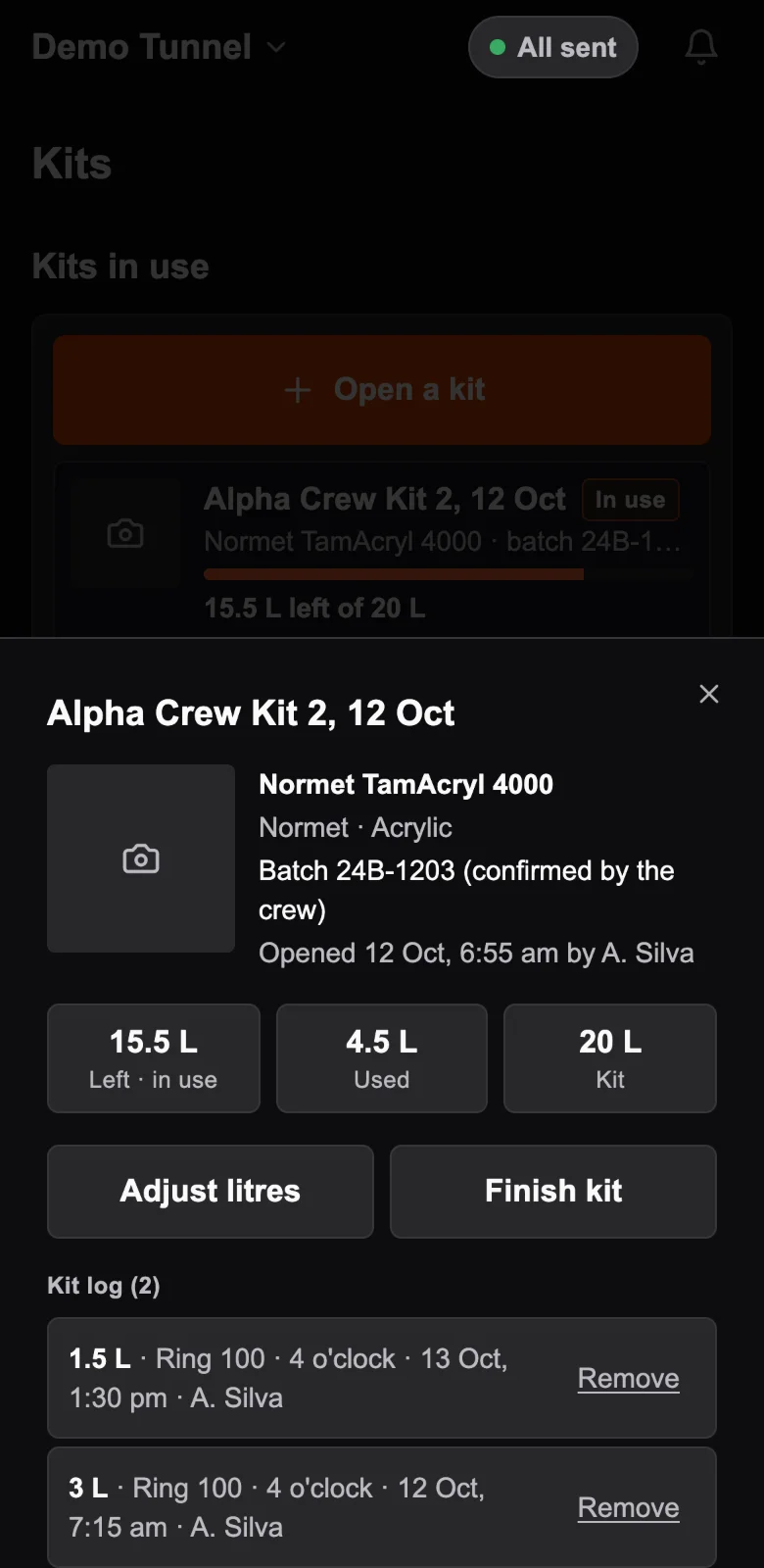
A kit's sheet: Normet TamAcryl 4000, batch 24B-1203, litres left and used, and its log of draws by ring, clock position, time and person

The kit's own log: 3 L at ring 100, 4 o'clock, on 12 Oct, then 1.5 L on the rework the next day. Batch 24B-1203.

What leaves the site

A record your client can audit.

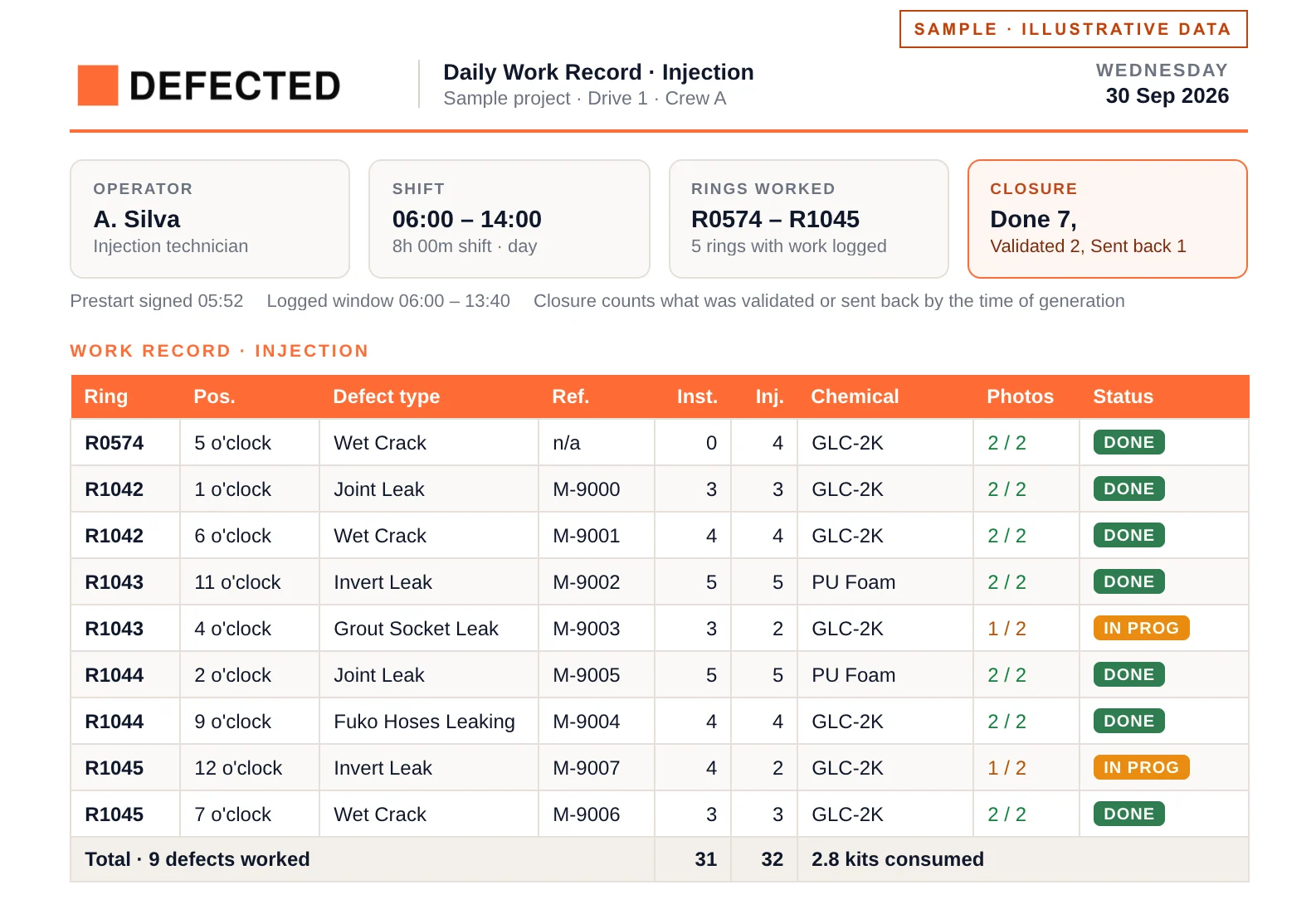
A sample daily work record: rings, clock positions, defect types, packers, chemical, photo pairs and status for one injection shift
Sample daily work record, illustrative data. The real record also carries every photo pair, the materials used and the shift sign-offs.

Each shift comes out as a daily work record: ring, clock position, packers, chemical, photos and status, signed off. Export by tunnel, chainage or date.

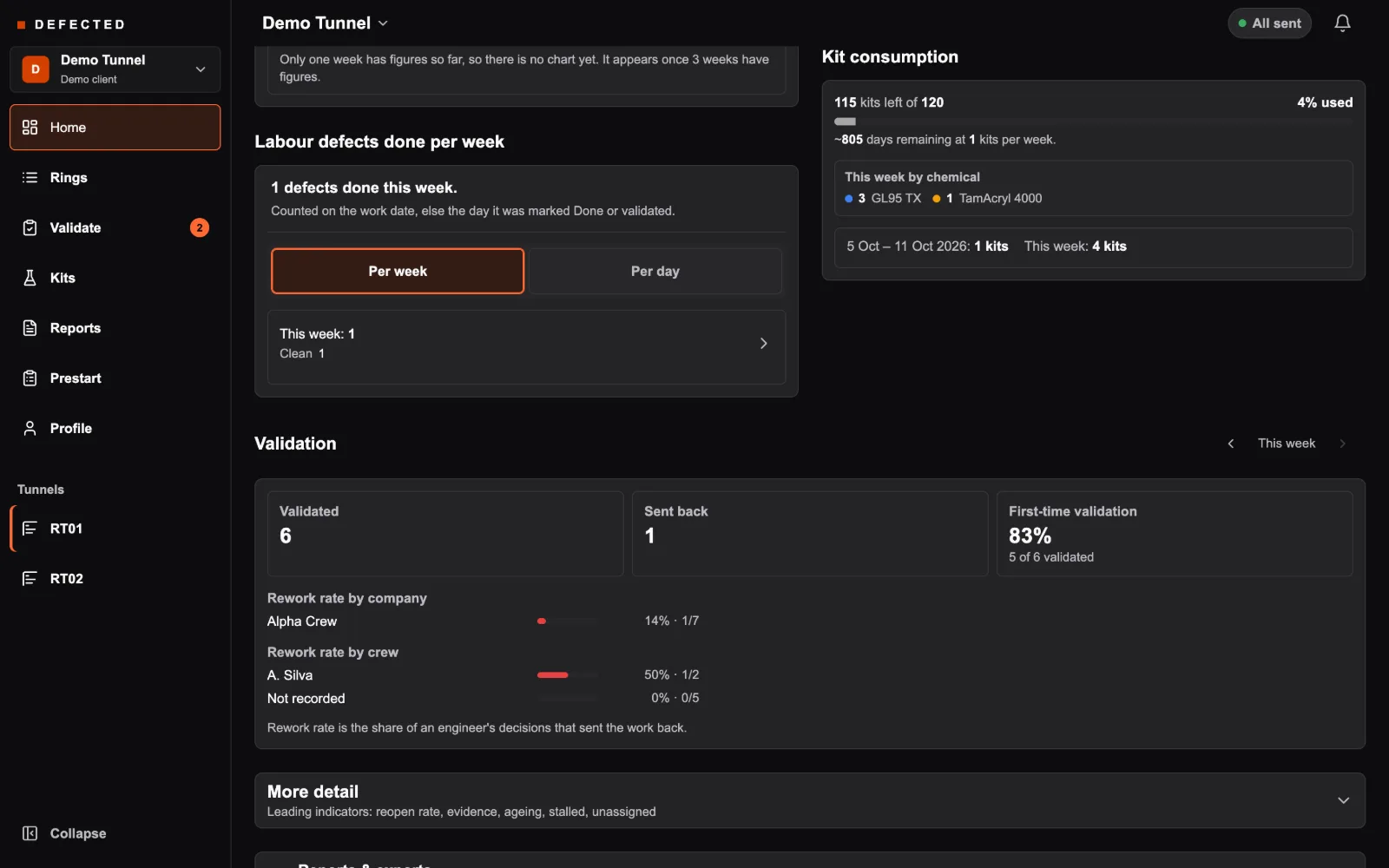
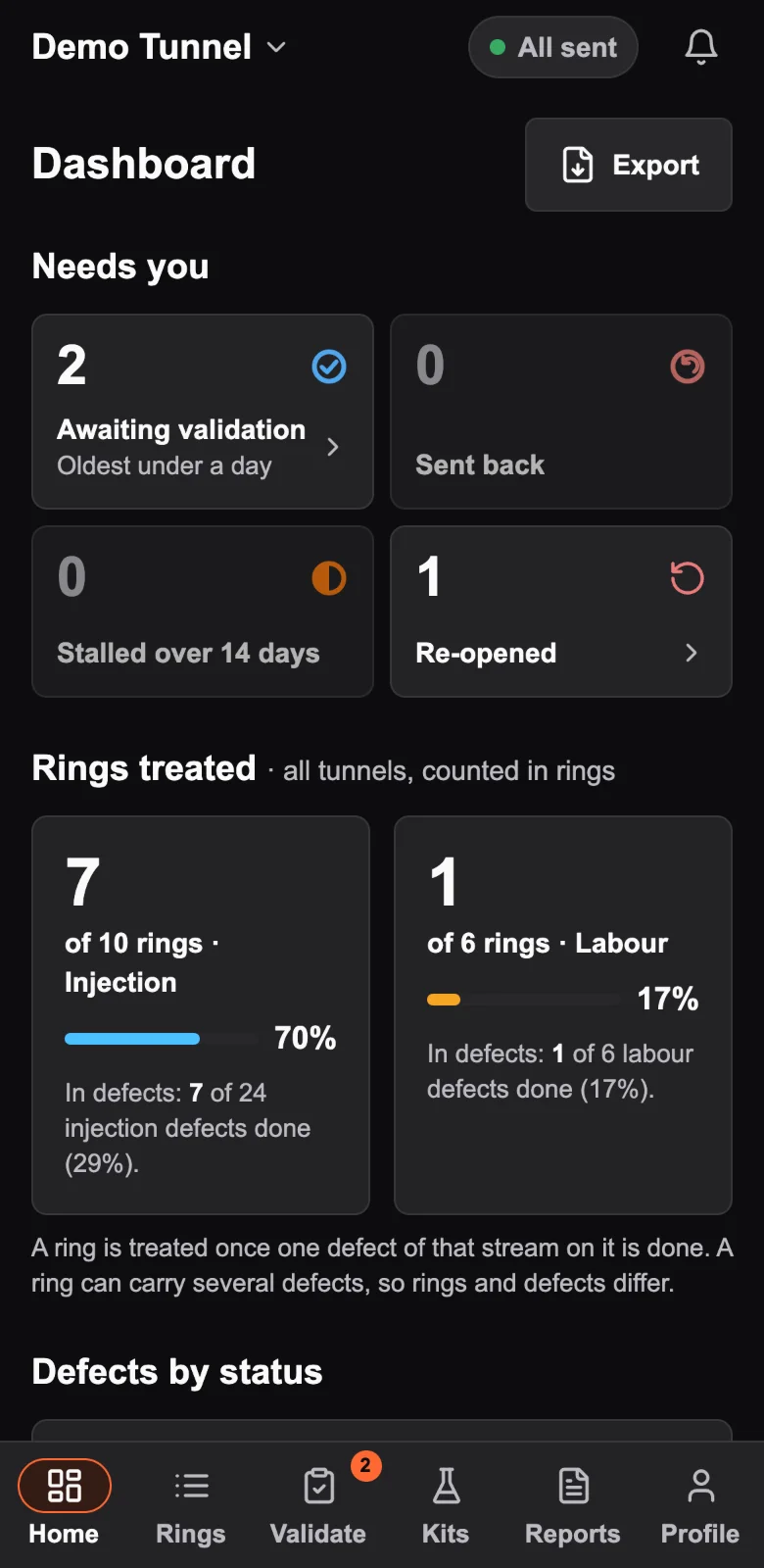
The project dashboard's validation cards: awaiting, validated, sent back, first-time validation at 83%, rework rate by company and by crew
For principal contractors

First-time validation and rework rate by company and by crew, week by week, and a weekly report across every company on the job.

Case studies

Live underground, on two kinds of work.

Sydney Metro West · Portion 1 · Tunnel defect repair

Two tunnel drives. One defect register.

Portion 1's defect repair works have been tracked in DEFECTED, from the issued DLP master defect list through to the photos that close each defect out.

defects imported from the issued DLP master defect list
3,158
tunnel drives on one shared register
2
2026: in production, after a pilot from 6 July
2 Aug
The principal contractor extended the engagement repeatedly, and it is still in use on the project.
  • Work streams split by role

    Injection and labour work streams are separated by role.

  • Ready for Autodesk Construction Cloud

    Validated defects export as an Autodesk Construction Cloud upload file, as categorised issues, and each is marked as sent.

  • Multiple subcontractors, one register

    Multiple subcontractors work the same register, with the work attributed to each company.

  • On the crews' own phones

    It runs on the phones the crews already carry and keeps working underground with no signal.

  • Evidence on every close-out

    Every closed defect carries before and after photos.

Read the deployment story
Civil construction project · Cavern joint and hose injection

Different works. Same app. Underground in five days.

On a civil construction project, injection in two caverns was being recorded on paper checklists. We started adapting DEFECTED to that work on 30 August 2026, and by 4 September it was running on a phone underground.

from the first day of work to use underground
5 days
slab joint trenches mapped, 13 in each cavern
26
injection workflows: hoses and packers
2
Sign-in, offline working, photos and the daily report came straight from the tunnel app. The cavern plan and its workflows were built for this job.
  • Built on the cavern plan

    Boxes and trenches sit on a plan of the caverns traced from the site drawing. A long press on a trench marks it in progress.

  • Injected in passes, logged in passes

    A pass is one round of the pump along a joint's packers. Litres and outcomes are logged packer by packer as the crew goes.

  • Litres against the canister

    Litres are logged against the kit they came from, so product use can be reconciled against the canisters opened on site.

  • The client's checklist, rebuilt

    The daily injection checklist comes out as a PDF laid out like the client's paper form, sign-off box included. Any box or trench can also be exported as its own evidence sheet.

  • Ready before the shift goes down

    A shift in the cavern is hours with no signal, so the app loads what the crew needs before they walk in and says plainly whether they are ready.

Tell us about your works
Questions

Before you put it underground.

Yes. The crew logs, photographs and records injection offline underground, and it syncs the moment the phone finds signal. Validating needs a connection; reading the evidence does not.

Only an engineer or a project admin. The crew marks work done; it stays awaiting validation until it is validated, and the database refuses a validation from anywhere else.

A daily work record per shift (ring, clock position, packers, chemical, photo pairs and sign-offs) and exports by tunnel, chainage or date. The principal contractor gets a weekly report across companies.

Validated defects export as an Autodesk Construction Cloud upload file, ready to bring in as categorised issues, and each defect is marked as sent so nothing goes twice. Tell us what you run.

If it hasn't replaced paper by day 10 of the pilot, you walk away with a full export of your data. No invoice, no obligation.

Two-week pilot · No commitment

Try DEFECTED on one heading. Free for 14 days.

We install on one tunnel face. Your crew uses it during normal shifts. If it doesn't replace paper by day 10, you walk away with a full data export. No invoice, no obligation.

  1. 01Discovery call30 min
  2. 02Pilot agreement1 page
  3. 03On-site setup1 hour
  4. 04Underground14 days
  5. 05Decisionyours
Prefer to talk first? Book a 30-minute call

Tell us about your project.

Name, company and email are all we need. We reply within 24h.

I'm interested in

Or email hello@defected.app. By sending you agree to our Privacy Policy.